Before you start · USB-capable computer, USB data cable and the correct board antenna.
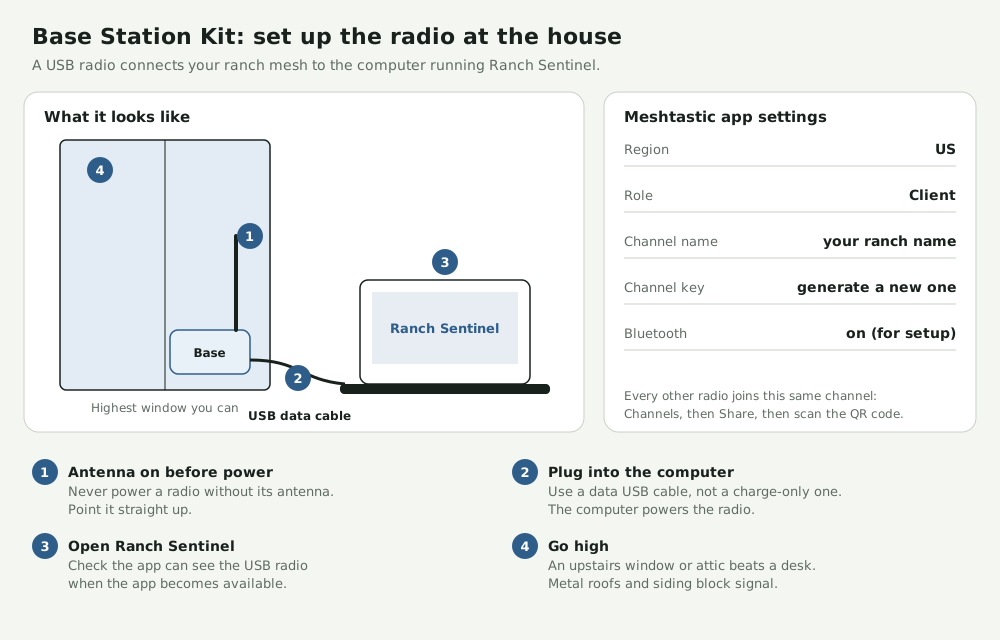
Prepare the radio Attach its antenna before powering it. If it needs firmware, use the Meshtastic flasher with a USB data cable and select the exact model and revision.
Create your ranch channel Start with Client role. Set the US region for US915 hardware. Create a named channel with a fresh key and share it only with radios on your ranch.
Place and connect the base Try a high window clear of metal and keep the antenna upright. Connect the radio to the computer with a USB data cable.
Verify a nearby field node Check for a fresh message from a nearby radio on your channel. If the computer cannot see the base, try a known data cable and another port.
These are example layouts. Confirm the pinout, power and fit for your exact parts. Field validation is pending.